Warehouse operations run on rhythm. Pickers, packers, forklifts and conveyors all move in sync and when that rhythm is broken, the cost can add up quickly. For a distribution center, even a few hours of downtime can mean late deliveries, higher shipping costs and upset customers. The same goes for a manufacturing plant, where the stakes rise further. A missing component can halt the assembly line, leaving machines idle and workers waiting, this can sometimes cost thousands of dollars per minute.
What’s surprising is that these costly line-stops are not always triggered by broken machinery or major system failures. More often, they happen because inventory wasn’t where it needed to be, when it was needed the most. That’s where replenishment strategies in Microsoft Dynamics 365 Warehouse Management System (D365 WMS) can save your warehouse operations, if you are already using Dynamics 365 Finance and Operations.
Replenishment is more than just “topping up” stock. It’s about ensuring that pick locations and production zones always have enough inventory ready, so the workers never waste time waiting for materials to arrive.
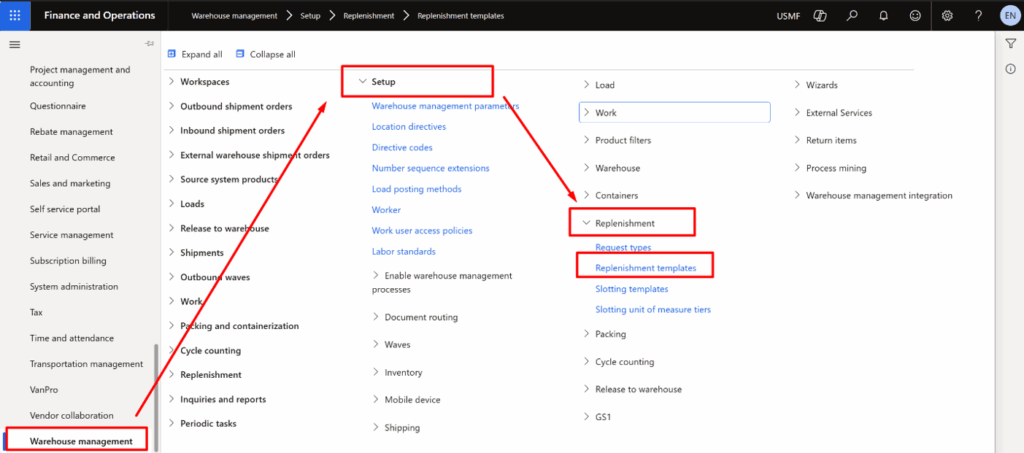
In Dynamics 365 Supply Chain Management, the Warehouse Management module is where these strategies are configured and executed. You can access it by navigating to Modules → Warehouse Management, where you’ll find setup options under Setup → Replenishment and operational tasks under Work. This is the control center for defining replenishment templates, location directives and work templates that automate inventory movement across your warehouse.
In this blog, we’ll take a closer look at replenishment strategies in D365 WMS, why they matter and how they can be configured to prevent downtime. Let’s explore.
Why Replenishment Strategy Matters?
Let’s put this into perspective. Picture a high-volume distribution center during the peak holiday season. Orders are grouped into waves, meaning batches of orders are released together to maximize picking efficiency. Pickers are moving fast, pulling items from pick faces. Halfway through the wave, the pick location for a top-selling product, say, a popular toy, runs out. Here’s what happens next:
- Supervisors scramble to request an urgent replenishment.
- Forklift drivers abandon their planned routes to fetch pallets from reserve storage.
- Pickers stand idle, waiting for stock to arrive.
This results in delayed orders and a chaotic warehouse floor. In a factory setting, it could mean assembly lines coming to a standstill. The truth is, when replenishment is done right, it prevents this situation altogether. D365 WMS offers four built-in replenishment strategies: Wave demand, Min/Max, Load demand and Immediate replenishment. Fixed picking locations can also be used in combination with these strategies.
Let’s walk through them in detail.
Wave Demand Quantity Replenishment
Wave demand replenishment doesn’t depend on thresholds. Instead, it triggers replenishment when an outbound wave, production order or kanban (an inventory control system used in just-in-time (JIT)) is processed.
Here’s what happens:
- A wave of orders is released.
- Before pickers start, the system checks whether pick locations have enough stock.
- If not, replenishment tasks are created so the stock is ready when workers arrive.
This is especially useful in manufacturing, where components must be staged before production. For instance, if an assembly line requires 500 microchips but the pick face only has 300, Dynamics 365 moves the missing 200 from reserve.
A key enabler is License Plate (LPs) tracking. Each pallet or case in D365 carries a unique ID, so the system knows exactly which pallet to move. Location directives linked with directive codes ensure the right stock goes to the right location. It is the best fit for high-volume outbound waves or manufacturing staging.
Using Fixed Picking Locations with Replenishment
Fixed Location Replenishment is not a separate strategy in Warehouse Management System but rather a way of combining fixed picking locations with replenishment strategies like Min/Max or Wave demand. You can assign a “golden zone” pick face for a product and ensure it always gets replenished according to thresholds or wave demand.
Think of it like your refrigerator’s water dispenser. The tank inside keeps getting refilled from the main water line, so you never run out in the middle of pouring a glass.
In D365 WMS, this process relies on:
- Location Directives: Rules that decide where stock should come from (e.g., Reserve Storage A1) and where it should go (Pick Zone B2).
- Work Templates: Instructions that guide workers through replenishment tasks step by step.
It is the best fit for retail distribution centers or e-Commerce operations with high-velocity SKUs that must always stay stocked.
Min/Max Replenishment for Automated Top Ups
Min/Max replenishment works like an automated top up system based on thresholds.
Here’s the process:
- Set a minimum level (the safety stock trigger).
- Set a maximum level (the refill target).
When stock drops below the minimum, the system replenishes the location back up to the maximum. For instance, imagine a fashion warehouse managing seasonal T-shirts. You set the minimum at 50 units and the maximum at 200. Once stock drops to 49, the system generates a replenishment task to refill back to 200.
But note that Min/Max replenishment usually runs as a scheduled batch job (not continuous real-time monitoring). Also, a fixed location must be set up for the item, otherwise the system won’t know where to replenish. It is the best fit for seasonal or unpredictable demand patterns.
Load Demand Replenishment
Load demand replenishment is often overlooked. It works by calculating replenishment needs for loads (grouped shipments) and generating replenishment in advance. This helps when several orders share the same transport load, ensuring pick locations are stocked before loading begins.
This is the best fit for the warehouses managing large outbound shipments consolidated into loads.
Immediate Replenishment
Immediate replenishment is triggered during allocation. If the system can’t allocate enough inventory for a wave or order line, it can create replenishment tasks on the spot before the wave finishes. This avoids situations where allocation fails entirely, though it’s usually a fallback method rather than a primary strategy.
It is the best fit for environments where orders can’t afford allocation failures (e.g., same-day or critical shipments).
How to Choose the Right Strategy?
Not every warehouse works the same way. Here’s how we have reflected it to guide you:
| Warehouse Scenario | Recommended Replenishment Strategy |
| Retail DC with high SKU velocity | Fixed picking locations + Min/Max |
| Seasonal, unpredictable demand | Min/Max |
| Large outbound waves or production staging | Wave demand |
| Load-based operations | Load demand |
| Critical orders needing backup | Immediate replenishment |
| Complex warehouses | Combine strategies (D365 supports multiple at once) |
Setting Up Replenishment in Dynamics 365 WMS
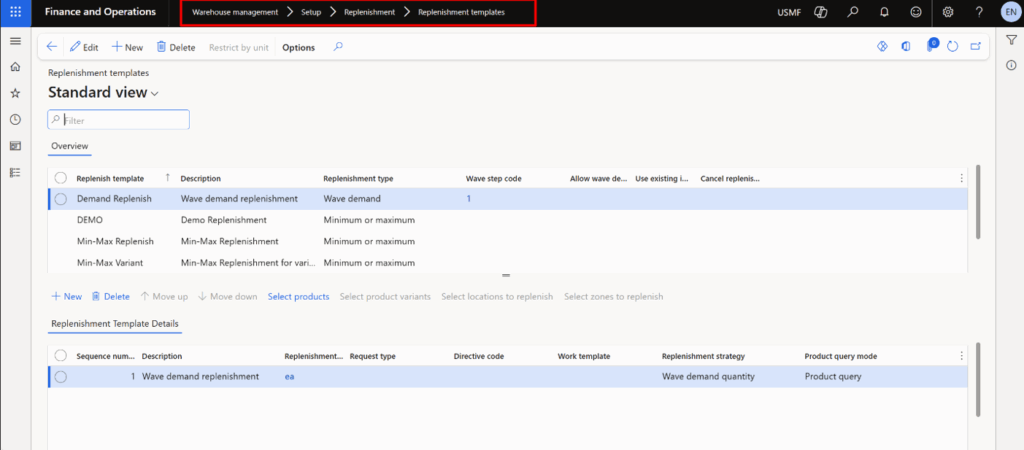
Configuring replenishment follows a logical flow:
Create replenishment templates → Choose type (Min/Max, Wave, Load, Immediate) and thresholds.
Define location directives → Tell the system where stock comes from and where it goes.
Set up work templates → Define worker tasks.
Schedule or trigger replenishment →
- Min/Max: scheduled batch job.
- Wave demand: at wave/production/kanban release.
- Load demand: scheduled batch job.
- Immediate: triggered during allocation.
Common Mistakes to Avoid
- Over-replenishment: Refilling too early congests pick zones. Test thresholds carefully.
- Under-replenishment: Safety stock set too low risks line-stops. Simulate demand before finalizing.
- Task interference: Running replenishment during heavy picking can slow both. Use prioritization.
The Future is Taking Us to Predictive Replenishment
The next stage of warehouse replenishment is shifting from rule-based approaches to predictive replenishment. Through AI demand sensing, machine learning models can anticipate SKU movement by analyzing patterns in sales history, promotions and seasonality.
At the same time, IoT shelf sensors, though not natively available, can be enabled through Azure IoT to detect stock levels and automatically trigger replenishment using custom workflows. On the execution side, dynamic task assignment is beginning to evolve with Microsoft Copilot which already delivers workload insights and natural language assistance while more advanced capabilities such as forklift route optimization still rely on Warehouse Execution Systems (WES), third-party solutions or custom development.
Together, these advancements point toward a future where replenishment is anticipated hours ahead of demand, steadily reducing the risk of stockouts to zero.
At Dynamics Solution and Technology, we don’t just configure systems, we help businesses transform their supply chain, finance, sales, HR and customer experience through Microsoft Dynamics 365. Whether your challenge lies in warehouse management, demand planning, payroll, CRM or retail operations, our team delivers tailored solutions that connect every process on a single intelligent platform.
From rule-based automation today to AI-driven operations tomorrow, we ensure your business is ready for growth, resilience and innovation. Partner with us to implement Dynamics 365 across your enterprise and move from bottlenecks to breakthroughs.
Book a Consultation Call with Us to Learn More.











 United Kingdom
 Saudi Arabia
 Canada
 UAE
UAE South Africa
 Pakistan
 India
India Malaysia
 Bahrain