
Finance is one of the most data-driven departments in any company, yet finance teams spend most of their valuable hours on tasks related to the low strategic value. From finalizing books quicker to turning in real-time insights for leadership, expectations have shifted far beyond the conventional reporting methods. At the same time, teams must manage developing records volumes; stricter compliance rules and growing pressure on strategic insights, not just operational reporting.
A key insight from Microsoft highlights the dimensions of this challenge: 80% of finance leaders struggle to move beyond the operational obligations into more strategic roles due to time-consuming manual work and fragmented structures.
This imbalance increases an important question: how can finance specialists shift their focus from repetitive tasks to strategic decision-making?
The solution is emerging through AI-powered transformation. Microsoft’s Copilot is designed to directly address this gap by embedding AI intelligence into daily financial workflows, assisting teams to work faster, smarter, and with greater confidence.
What Is Microsoft Copilot?
Microsoft’s Copilot is an AI assistant embedded in Microsoft 365 designed exclusively for professionals. Unlike general-purpose AI tools, it is purpose-built to understand financial workflows from account receivable and variance analysis to collections management and FP&A forecasting.
It is integrated inside Microsoft 365 applications your team already uses daily: Excel for evaluation, Outlook for collections and communications, and Teams for collaboration. Through prebuilt connectors in Microsoft Copilot Studio, it integrates with an organization’s financial structures consisting of Microsoft Dynamics 365 Finance, pulling live data and surfacing it through a conversational, natural language interface.
Core Features of Microsoft Copilot for Finance
1. AI-Powered Variance Analysis
Variance analysis evaluating real financial outcomes in opposition to budgets or forecasts is one of the most time-consuming tasks in any finance function. Microsoft Copilot transforms it into a conversational task.
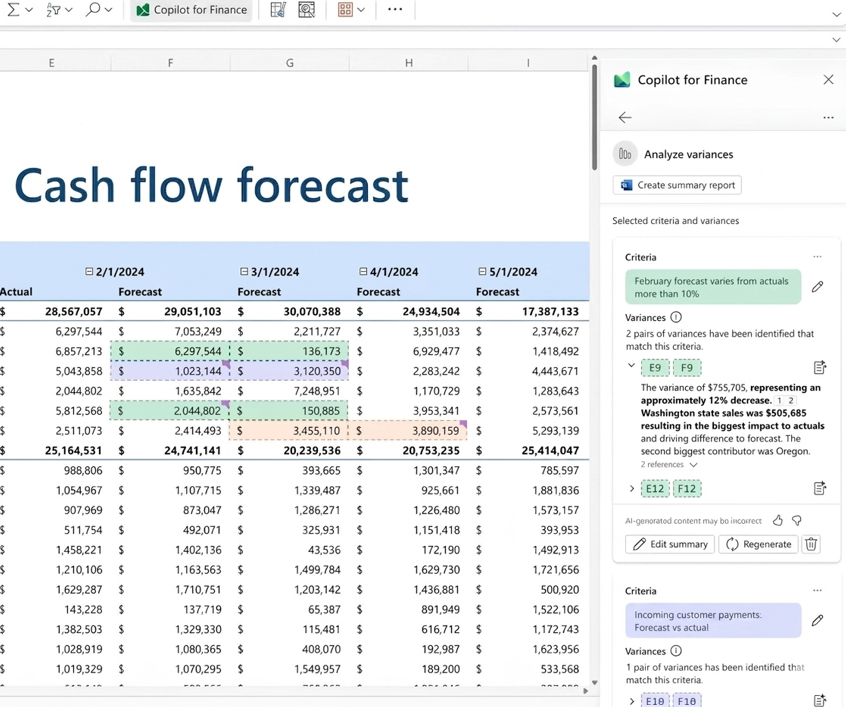
(Microsoft Copilot in Excel studying client’s cash flow forecast variances in opposition to actual using natural language criteria.)
Financial Analysts set criteria in simple English (e.g., it flags any forecast that varies from actuals by more than 10%’) and Copilot immediately surfaces each matching discrepancy with full context, cell references, and a suggested explanation. It also can generate stakeholder remarks, PowerPoint summaries, and follow-up emails all without leaving Excel.
2. Data Reconciliation Through Automation
Manual reconciliation is where errors hide and hours disappear. Microsoft Copilot for Finance automates the complete transaction-matching procedure figuring out unmatched items, flagging anomalies, and producing a structured reconciliation report ready for audit.
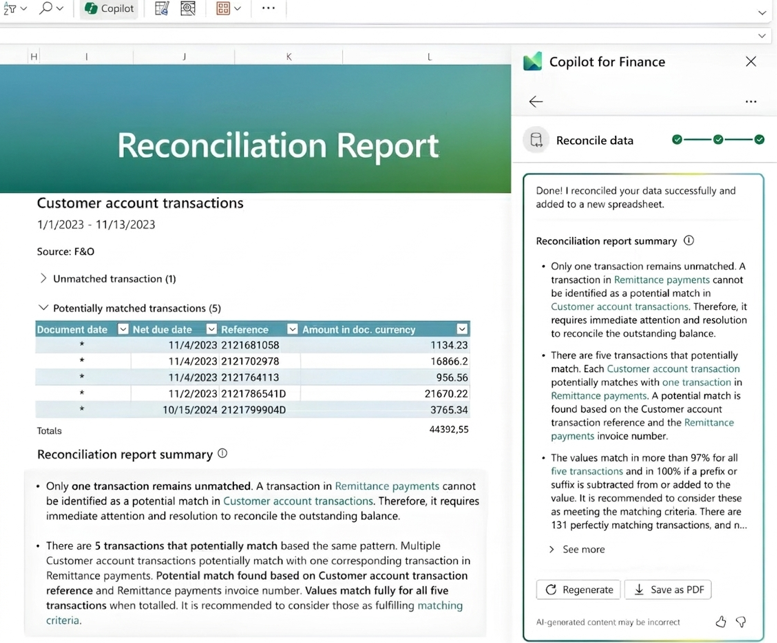
(Microsoft Copilot for Finance reconciling client’s consumer account transactions auto-producing a reconciliation record with matched items, exceptions, and a PDF-ready summary)
Month-end close cycles that formerly stretched throughout days may be compressed significantly. The reconciliation record is robotically documented and exportable as an instantaneous win for audit readiness and compliance.
3. Natural Language Financial Queries
Finance professionals no longer need to know the right report, the right filter, or the right formula. They simply ask Copilot for Finance in plain English and get answers instantly:
- What were our top expense drivers in Q3 vs. budget?
- Which receivables accounts are more than 60 days overdue?
- Show me cash flow anomalies from the last quarter.
- Summarize this month’s revenue performance against forecast.
4. Smart Collections & Cash Flow Insights
Collections management is a high-volume, high-stakes workflow that typically eats hours of manual work. Microsoft Copilot changes fundamentally.
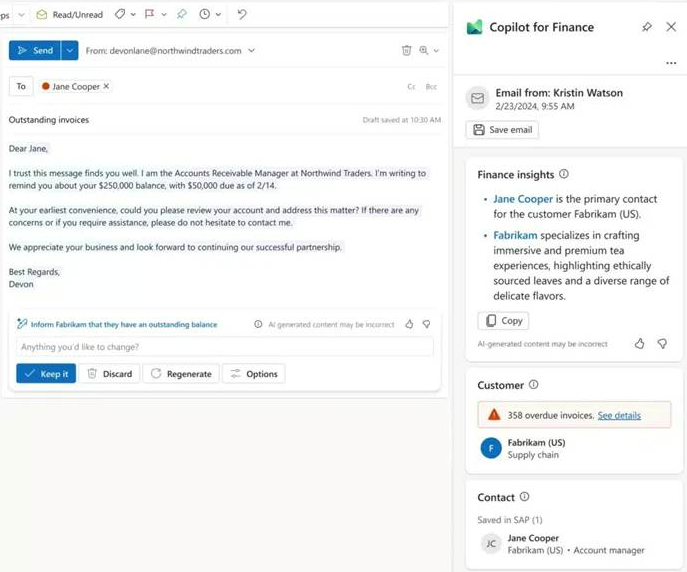
(Copilot for Finance in Outlook auto-drafting a collections email for an overdue account with live finance insights, customer context from SAP, and 358 flagged overdue invoices)
Finance teams get prioritized account lists, AI-drafted outreach emails with relevant invoice attachments, suggested payment options, and ERP-synced interaction logs all from within Outlook. The manager above can see a customer’s full balance context, overdue invoice count, and a ready-to-send email without opening the ERP once.
Microsoft Copilot vs Traditional Finance Tools
One of the most common questions finance leaders ask is: how does this compare to what we already have? Here is an honest breakdown:
| Traditional Finance Tools | Microsoft Copilot for Finance |
| Manual Excel workflows hours per report | Natural language queries answers in seconds |
| Copy-paste reconciliation with frequent errors | Automated transaction matching with exception flags |
| Static ERP reports refreshed on a schedule | Live financial data from Dynamics 365 / SAP in real time |
| Variance commentary written manually per analyst | Consistent, AI-generated commentary with source references |
| Collections tracked in spreadsheets | AI-prioritized accounts + auto-drafted Outlook emails |
| Month-end close takes 5–10 days | Close cycles compressed by days with automated reporting |
How Microsoft Copilot Works with Microsoft Dynamics 365 Finance
Microsoft Copilot for Finance reaches its full potential when integrated with Microsoft Dynamics 365 Finance. Dynamics 365 acts as the central financial hub unifying transaction data, automating core workflows, and managing compliance across the organization. When Copilot plugs into this foundation, it gains access to live, accurate financial data rather than static exports. The result is AI that analyzes current numbers, not yesterday’s snapshot. Finance teams get real-time insights within the Microsoft 365 environment they are already working in no tab-switching, no waiting on BI teams, no manual data pulls.
The Future of AI in Finance: From Operational to Advisory
The role of financial professionals is rapidly growing. The teams that will deliver the most value over the next five years are not the ones that process data fastest; they are the ones that have freed themselves from processing it manually at all.
Microsoft Copilot, integrated with Microsoft Dynamics 365, makes that shift possible today. It does not replace the finance professional; it removes the ceiling that has kept them from doing their best work. The result is a finance function that is faster, more accurate, and genuinely strategic.
The question is not whether AI will reshape finance. IDC data already confirms that 68% of CFOs expect it to drive revenue growth within five years using AI. The question is whether your organization will lead that change or catch up to it later.
At Dynamics Solution and Technology, we’re here to help you unlock the full potential of Microsoft Copilot and Dynamics 365. Reach out to us today and let’s work together to take your finance operations with AI-driven intelligence.
FAQs
Q1. What is Microsoft Copilot for Finance?
Microsoft Copilot for Finance is a Microsoft 365-integrated AI-driven tool. It helps finance teams to automate tasks and analyze data to gain insights based on natural language queries.
Q2. How does Microsoft Copilot improve financial reporting?
Copilot automates financial reporting procedures. It makes reports on variances, trends, and predictions fast, saving time and eliminating human errors.
Q3. Can Microsoft Copilot integrate with existing financial systems?
Copilot also works seamlessly with ERP systems such as Dynamics 365 and other financial systems. This ensures that there is a smooth workflow and data access across systems.
Q4. What are the benefits of using AI in finance?
AI in finance yields efficiency in finance by automating repetitive operations. It facilitates decision-making by providing insights based on real-time data. It (AI) reduces operational costs, with better accuracy and compliance.











 United Kingdom
 Saudi Arabia
 Canada
 UAE
UAE South Africa
 Pakistan
 India
India Malaysia
 Bahrain