E-invoicing compliance is no longer optional for businesses operating in Saudi Arabia. Phase 1 closed the door on manual invoicing back in December 2021, and Phase 2 the Integration Phase has been steadily tightening the net ever since. With Wave 25 now in effect, the annual revenue threshold has dropped to SAR 187,500, which means nearly every SME in the Kingdom now falls under mandatory ZATCA integration, with a compliance deadline of 1 February 2027.
Non-compliance penalties range from SAR 5,000 up to SAR 50,000 depending on the violation; a risk few businesses can afford. For companies running Microsoft Dynamics 365 Business Central as their ERP, the real question is no longer whether to pursue ZATCA integration, but how to get it done quickly, correctly, and with minimal disruption to daily operations. At Dynamics solutions and technology, this is exactly the kind of compliance challenge we help Saudi businesses solve every week.
This article will break down what ZATCA e invoicing Phase 2 actually requires how the integration works inside Business Central and what to look for in an implementation partner.
What Is ZATCA E-Invoicing, and Why Does Phase 2 Matter?
ZATCA ( Zakat, Tax and Customs Authority) is the government body responsible for tax and customs regulation in Saudi Arabia. Its Fatoora initiative, in effect since 2021, is the Kingdom’s mandatory e-invoicing framework, requiring VAT-registered businesses to generate, store, and share invoices electronically instead of on paper or in unstructured digital files.
The rollout has happened in two stages.
Phase 1, the Generation Phase, went live in December 2021 and simply required businesses to produce structured digital invoices.
Phase 2, the Integration Phase, is a different animal altogether: it requires your invoicing system to connect directly to ZATCA’s platform in real time, with invoices cleared or reported before they ever reach the buyer.
ZATCA is enforcing Phase 2 in waves, grouped by annual taxable revenue. Earlier waves covering larger businesses have already passed their deadlines and are in full enforcement. The current wave applies to businesses above SAR 187,500 in annual revenue, giving smaller and mid-sized companies a hard deadline to get compliant. If your business sits above any prior threshold and isn’t yet integrated, compliance is either overdue or a fast-approaching legal risk.
What Phase 2 Actually Requires
- Every invoice must be generated in structured XML/UBL format.
- Each invoice must carry a cryptographic stamp (CSID) issued by ZATCA.
- Standard B2B and B2G invoices go through real-time clearance before reaching the buyer.
- Simplified B2C invoices are reported to ZATCA within 24 hours of issuance.
- Every invoice must embed a QR code encoding key invoice data for verification.
This isn’t a workflow a finance team can manage by hand. Without a system that automates it end to end, businesses end up either delaying invoices or risking non-compliant submissions both of which create real operational and legal exposure.
Why Business Central Needs a Dedicated ZATCA Integration
Dynamics 365 Business Central is a popular choice for small and mid-sized businesses across Saudi Arabia, thanks to its flexibility and deep integration with the Microsoft ecosystem. What often surprises finance and IT teams, though, is that Business Central does not ship with native ZATCA Phase 2 compliance. Localization is delivered through certified third-party extensions on Microsoft AppSource, not a built-in module.
That distinction matters. Simply having a licensed Business Central environment does not make your invoicing ZATCA-compliant. Without a certified extension handling CSID onboarding, XML generation, digital signing, and real-time API submission, every invoice you issue could be treated as non-compliant. The consequences are tangible: invoices can be rejected by ZATCA’s system, buyers on Phase 2 may refuse invoices that haven’t been cleared, and beyond the SAR 5,000–50,000 penalty range, businesses face rework, delayed payments, and audit exposure.
How the Integration Works Inside Business Central
Once a certified ZATCA extension is deployed, the entire Phase 2 workflow runs inside the ERP without manual intervention at each step:
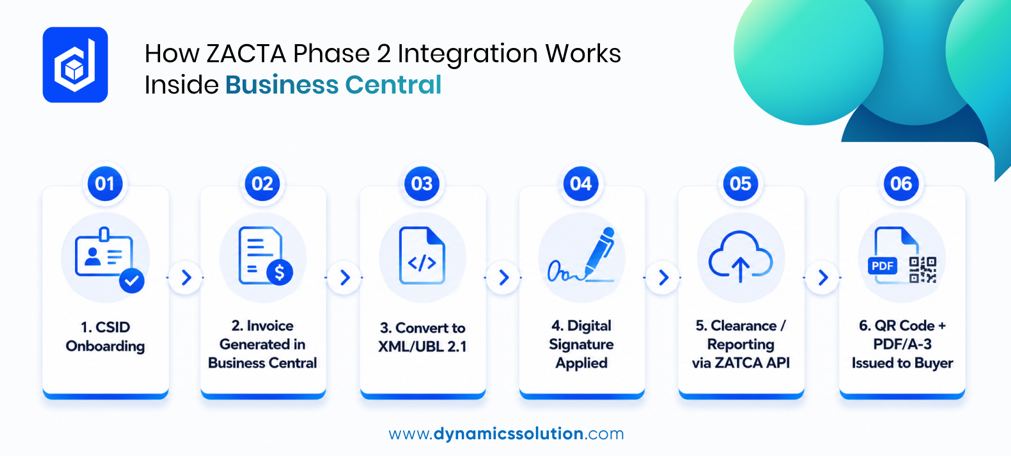
- CSID onboarding: the business registers its electronic generation solution with ZATCA to receive a Cryptographic Stamp Identifier, first via a Compliance CSID for testing, then a Production CSID for live invoicing.
- Invoice generation: invoices are created inside Business Central through normal daily operations, exactly as before.
- XML/UBL conversion: the extension intercepts each invoice at posting and converts it into ZATCA’s required UBL 2.1 XML format.
- Digital signing: the XML invoice is cryptographically signed using the business’s CSID, confirming it hasn’t been altered after generation.
- Clearance or reporting: B2B and B2G invoices are submitted for real-time clearance before reaching the buyer; B2C invoices are reported within 24 hours.
- QR code and PDF/A-3 output: every invoice is issued with an embedded QR code and rendered as a PDF/A-3 file, satisfying both human- and machine-readable requirements.
The Compliance Building Blocks, Explained
Four technical elements sit at the core of any Business Central ZATCA extension:
- CSID: a Compliance CSID for testing and a Production CSID for live operations, renewed periodically.
- XML/UBL format: invoices structured with mandatory fields i.e seller and buyer details, line items, VAT breakdown, and a unique invoice UUID.
- Hash chain (ICV & PIH): each invoice carries a sequential counter and the hash of the previous invoice, linking every invoice into an unbroken, tamper-evident chain.
- QR code: built on ZATCA’s TLV encoding standard, embedding the invoice hash, cryptographic stamp, public key, and public key signature.
A properly built extension automates all four; no manual data entry, no formatting work for the finance team.
Key Benefits Beyond Compliance
ZATCA compliance is a legal requirement, but businesses that complete Phase 2 integration well typically see benefits that go beyond simply avoiding penalties:
- Faster invoice clearance and shorter payment cycles.
- Fewer disputes and rejections thanks to validated, structured data.
- Lower administrative overhead, with QR generation and submission fully automated.
- Faster VAT return preparation, since invoice data is already with ZATCA in real time.
- Stronger trust with suppliers and buyers through tamper-proof, cryptographically stamped invoices.
Whether your business operates from Riyadh, Jeddah, Dammam, or Khobar, the compliance timeline is the same but companies that integrate early are consistently better positioned for smoother month-end closes and fewer invoicing headaches down the road.
Getting Started with Us
If your business runs Dynamics 365 Business Central and is approaching a ZATCA Phase 2 wave deadline, the priority is finding an implementation partner who understands both the ERP and the regulatory detail i.e CSID onboarding, XML/UBL formatting, the hash chain, and QR code generation all need to work together without disrupting daily operations.
At Dynamics solution and technology, we work with Saudi businesses to assess their current Business Central environment, scope the right ZATCA extension, and manage the CSID onboarding and go-live process from start to finish so your invoicing stays compliant well ahead of the deadline, not scrambling to catch up after it.
DS E-Fatoorah Powered by Dynamics solution and technologyb helps businesses streamline their ZATCA e-invoicing requirements with an integrated approach to compliance and electronic invoicing.
Every invoice cycle that passes without proper clearance is a compliance gap that carries real financial and operational risk.
Don’t wait for Wave 25 to become a deadline. Start your ZATCA readiness journey today.
Ready to prepare for Wave 25? Talk to our experts and get your ZATCA e-invoicing integration started.
Frequently Asked Questions
Q1. What is ZATCA integration with Business Central?
It connects Business Central with ZATCA Fatoora to automate invoice generation, digital signing, clearance/reporting, and QR code requirements.
Q2. Is ZATCA Phase 2 built into Business Central?
No. A certified third-party extension is required for ZATCA Phase 2 compliance.
Q3. What are the penalties for ZATCA non-compliance?
Penalties can range from SAR 5,000 to SAR 50,000, depending on the violation.
Q4. How long does Business Central ZATCA integration take?
Timelines vary based on your ERP setup, invoice volume, and number of legal entities. CSID onboarding and compliance testing are also part of the process.
Q5. Can ZATCA integration work with other ERP systems?
Yes. ZATCA integration can be implemented across different ERP environments, including other Dynamics 365 solutions.











 United Kingdom
 Saudi Arabia
 Canada
 UAE
UAE South Africa
 Pakistan
 India
India Malaysia
 Bahrain